Deprecated page This is a very old page kept around for archival purposes only. Most probably the content here is no longer relevant.
Plugin compatibility fix for Photoshop CS5 Mac
Having troubles using older plugins in Adobe Photoshop CS5 on Mac OS X? Download and run this Photoshop launcher
The problem
By default, older plugins won't appear in Adobe Photoshop CS5 on Mac OS X: it runs in 64-bit mode. That's highly appreciated: this way Photoshop CS5 could use more RAM and perform faster. On the other hand, the vast majority of plugins were made for CS2-CS4 which only existed in the 32-bit world. To use those in Photoshop CS5 you have to run Photoshop in 32-bit, losing all the advantages of 64-bit mode. Other than that you can constantly switch 'em by restarting Photoshop in different modes every time you need a plugin. Nothing short of a nightmare.
The solution
This little tool launches Photoshop CS5 in 32-bit mode making it compatible with all plugins. Just let the Finder run Photoshop CS5 in 64-bit mode (the default) and when you need plugins — run this tool.
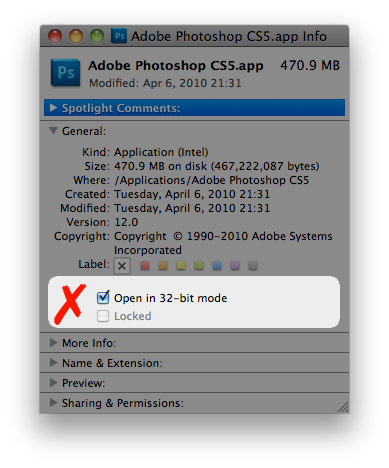
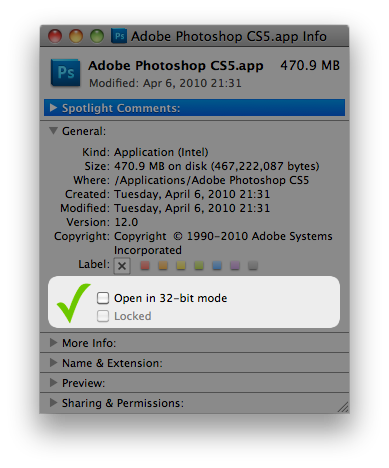
Just make sure that the Photoshop is being ran in 64-bit mode by default:
Finder → Adobe Photoshop CS5.app → Get info:
Also
Using this tool you can have TWO Photoshop instances running. It's very handy to have one in 64-bit for the main workflow and another in 32-bit just for filters. Use the clipboard to pass data back and forth.
If you just want to run two copies of Photoshop simultaneously, there's an easy way on 10.7 and 10.8. Open Terminal.app and type:
open -n /Applications/Adobe Photoshop CS5/Adobe Photoshop CS5.app
However, you should know that Photoshop CS5 was not intended to run that way and might crash. You have been warned.
And by the way
This tool will only execute Photoshop installed at /Applications/Adobe Photoshop CS5/Adobe Photoshop CS5.app
Mac OS X 10.6, 10.7 or 10.8 is required.
Questions? Comments? Leave me a comment in my blog or drop me an email.
Download
Download
PhotoshopCS532bit.app.zip (260Kb)RunCS5.tar.bz2 (3.2Mb) source code (you don't need that)